How to Choose the Best DMX Controller for Your Church (Compared)

So, you’ve been tasked with "fixing the lights" or upgrading your church’s stage presence, and you’ve run head-first into the world of DMX. If you’ve spent any time researching, you’ve probably realized that choosing a DMX controller feels less like buying a piece of gear and more like learning a whole new language.
Between the massive consoles that look like they belong on a Star Trek set and the software-only solutions that require a degree in computer science to patch, it’s easy to feel overwhelmed. Honestly? It shouldn't be this hard.
At SM Lights, we’ve spent over 17 years in the AVL world, and we’ve seen it all, from the "floating head in darkness" problem to the volunteer who accidentally blacked out the entire sanctuary during the sermon. We know you need something that is professional enough for HD livestreams but simple enough for a high school volunteer to run on a Sunday morning.
Let's break down how to find the right dmx lighting control for your specific needs.
The Big Differences (In Plain English)
Before we look at specific gear, we have to address the "brains" of your system. There are generally three ways to control church stage lighting:
1. Software-Only Solutions
Think of this as a program on your laptop. You plug in a USB-to-DMX adapter (sometimes called a "dongle"), and you click your way through the service.
- The Superpower: It’s usually the cheapest way to get high-end features. Often volunteer friendly to set up and run. Most of the big boys have a free download that gives you all the power for a more affordable price.
- The Reality Check: Relying on a general-purpose computer is risky. If Windows decides to run an update in the middle of worship, or a driver crashes, your lights go dark. Plus, mixing "live" with a mouse and keyboard is... well, it's frustrating. The other issue is a lot of the popular programs come with a yearly subscription. Often we see churches loose the license key and have to repurchase it. Another common issues when you update the computer the program is no longer compatible or the other way around. This creates a huge head ache.
2. Traditional Hardware Consoles
These are the physical "desks" with faders, buttons, and knobs.
- The Superpower: They are incredibly stable. No OS crashes, and you get tactile feedback. You also get near limitless expansion capabilities. These consoles are used on big tours for a reason.
- The Reality Check: The high-end ones are eye-wateringly expensive, and the budget ones are often too limited for modern LED fixtures and moving heads.
3. The "Hybrid" Approach (Our Favorite)
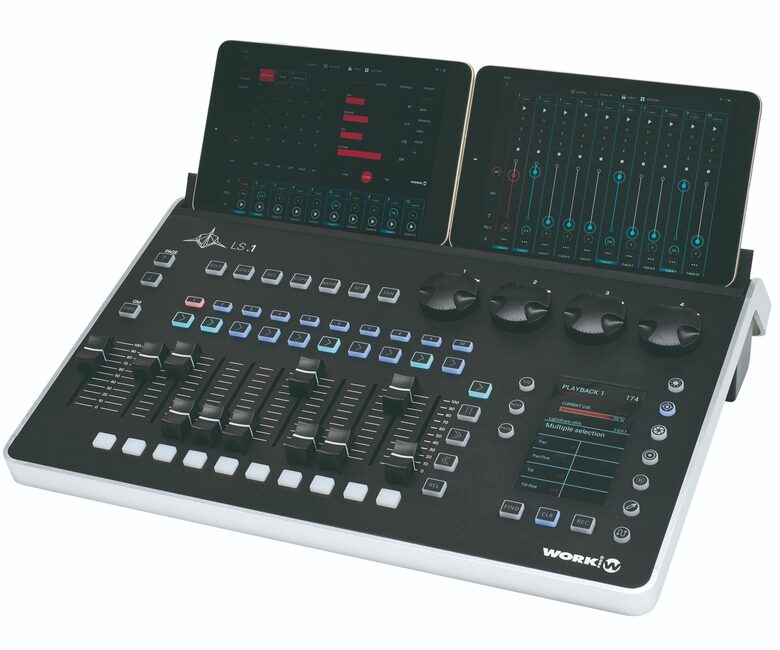
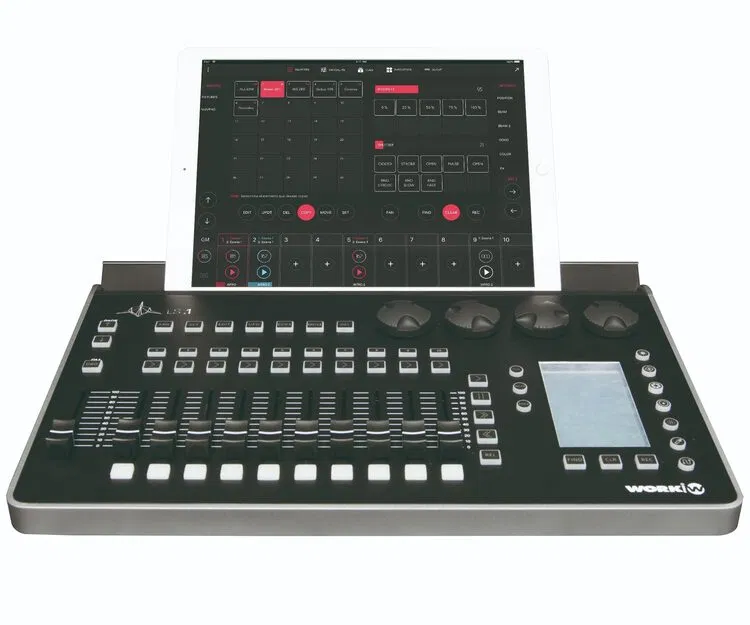
This is where systems like the Light Shark LS-1 live. You get a physical control surface with faders and buttons, but the "brains" are dedicated hardware inside the box. You use a tablet or laptop just as a screen to see what’s happening.
Why the Light Shark LS-1 is a Game-Changer for Churches
If you’re a small-to-medium-sized church, the Light Shark LS-1 is likely the "Goldilocks" solution you’ve been looking for. It isn't just a controller; it’s a dedicated lighting engine.
Volunteer-Friendly Design
Let’s be honest: your lighting team is likely made up of volunteers who have other jobs and busy lives. They don't have 40 hours a week to master a complex platform. The LS-1 features physical faders that allow a volunteer to literally feel the transition. You can label a fader "Worship Wash" or "Sermon Preset," and they’re good to go. Done.
8 Universes of Power
In the lighting world, a "Universe" is 512 channels. Most small churches only need one. The LS-1 gives you eight. Why does that matter? It means you won't outgrow this console for a decade. Even if you add moving lights, LED walls, and complex pixel-mapped bars later, the LS-1 can handle it.
Browser-Based Control
The coolest part? You don't need to install software. The LS-1 creates its own Wi-Fi network. You just open a web browser on your iPad, Android tablet, or laptop, and the control interface pops up. You can even walk around the sanctuary with your tablet to update your "looks" from the back of the room rather than being stuck in the booth.
Comparing Your Options: A Quick Framework
Still not sure which way to go? Use this decision-making guide:
| Feature | Software (PC-Based) | Small Hardware Desk | Hybrid (LS-1) |
|---|---|---|---|
| Tactile Feel | None (unless you buy wings) | Physical Faders | Physical Faders + Encoders |
| Stability | Depends on the PC | Very High | Very High (Dedicated HW) |
| Learning Curve | High (Often complex UI) | Low (But limited) | Medium (Easy to learn, deep features) |
| Livestream Ready | Yes | Often no | Yes (Flicker-free control) |
| Scalability | High | Low | Very High (8 Universes) |
What "Stage Lighting" Actually Means for You
When choosing a dmx controller, you have to think about what it’s actually controlling. Are you just turning on three white lights, or are you creating an atmosphere?
Modern churches need stage lighting that handles:
- Front Wash: Ensuring the pastor’s face is clear on camera (crucial for livestreaming).
- Color Mixing: Changing the mood of the room during worship sets.
- Dynamic Movement: Using moving heads to add energy without being distracting.
The LS-1 has a built-in "FX Engine" that makes things like "color chases" or "gentle movements" take seconds to program rather than hours. Think of it as a paintbrush vs. a pencil: it just covers more ground, faster.

Important: Don't Forget the "Broadcast" Factor
A factor that didn't matter much a decade ago is now the top priority for most churches: the livestream.
If your dmx lighting control doesn't work well with high-definition cameras, you’ll see "banding" or "flickering" on your YouTube feed. While the controller itself doesn't cause the flicker (the fixtures do), a professional controller like the LS-1 allows you to fine-tune the intensity and PWM (Pulse Width Modulation) settings of your fixtures much more effectively than a cheap "fader box."
Pairing an LS-1 with flicker-free LED fixtures ensures your online congregation sees the same quality as those sitting in the front row.
Ready to Simplify Your Sunday Morning?
Choosing the right controller is about finding the balance between power and usability. You want a rig that looks professional on video but doesn't require a full-time staff member to operate.
At SM Lights, we don't just sell boxes. We’re the lighting arm of Shepherd Multimedia, and we’ve spent twenty years doing hands-on AVL installations. We only sell gear we’d trust in our own projects.
If you're feeling stuck, fair question. It's a big decision. We're here to help you figure out if the LS-1 is the right fit or if one of our complete stage packages would serve your vision better.
Want a personalized recommendation?
Reach out to our US-based team of lighting pros. We'll help you get the clarity you need to make your next service shine.